

The journey of a thousand pages begins with a single word, but it ends with a meticulously formatted book. Many authors believe that once the final sentence is written and the story is edited, the hard work is over. However, there is a technical bridge between a raw manuscript and a professional book that every author must cross: the formatting stage.
Formatting is the process of designing the interior of your book to ensure it is readable, professional, and compatible with various publishing platforms. Whether you are aiming for a digital ebook or a physical paperback, the quality of your formatting can make or break your success. A poorly formatted book is difficult to read and reflects poorly on your brand. To ensure your book meets global standards, you must prepare your manuscript specifically for the formatting phase.
This guide provides a detailed checklist to help you clean your file and prepare it for a professional formatter. By following these steps, you will ensure a smoother transition and a much higher-quality final product.
1. The Cleanup: Removing Invisible Formatting Clutter
Most writers use word processors like Microsoft Word to draft their stories. While these tools are excellent for writing, they often hide “invisible” formatting that can cause major issues during the layout phase. Professional formatting software interprets every keystroke, so your first task is to remove unnecessary “clutter.”
Eliminate Double Spaces
In the days of manual typewriters, it was standard to use two spaces after a period. However, in modern digital and print publishing, this practice is obsolete. Double spaces create “rivers of white” on the page, which distract readers and look unprofessional. You should use the “Find and Replace” tool to search for double spaces and replace them with single spaces throughout the entire document.
Avoid Using the Tab Key for Indents
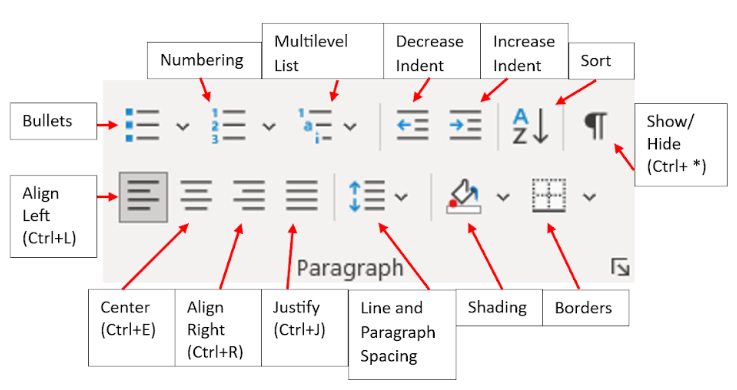
Many authors use the “Tab” key to indent the first line of a paragraph. While this looks correct on your screen, it creates a technical nightmare for formatters. Instead of manual tabs, you should set paragraph indentations using the “Paragraph Settings” menu in your word processor. If you have already used tabs, a professional formatter will have to remove them one by one, which can increase the time and cost of your project.
Use Proper Page Breaks
If you want to start a new chapter on a new page, never hit the “Enter” key repeatedly until you reach the next page. This creates a series of empty paragraph marks that will appear as huge gaps in an ebook. Always use a formal “Page Break” (Ctrl + Enter) or a “Section Break” to move to a new page. This ensures that the text stays in its proper place regardless of the screen size or device.
2. Organizing the Structural Elements
A book is more than just its chapters. It is a cohesive product that requires specific structural elements to be legally protected and professionally presented. You must organize your manuscript into three main sections: Front Matter, Body Matter, and Back Matter.
The Front Matter Checklist
The front matter includes everything that appears before Chapter One. You should prepare the following pages:
- Title Page: This should clearly state the book title, subtitle, and author name.
- Copyright Page: This is the most important legal page. It should include your copyright notice, ISBN, and any disclaimers. You can find more information about legal requirements at the U.S. Copyright Office.
- Dedication: A short page where you honor someone special.
- Table of Contents: While the formatter will generate the final version, you must provide a list of your chapters so they know the correct order.
The Back Matter Checklist
The back matter provides additional value and helps you build a relationship with your readers:
- About the Author: A professional biography and a high-resolution photo.
- Acknowledgments: A section to thank your editors, family, and supporters.
- Call to Action: This is where you ask readers to leave a review on Amazon or sign up for your newsletter.
- Other Books by the Author: A list of your previous or upcoming works.
If you are unsure about the order of these pages, you can refer to the Chicago Manual of Style, which provides the industry-standard sequence for book elements.
3. Mastering Styles and Headings
Consistency is the hallmark of a professional book. If your first chapter heading is in 24-point bold font, every other chapter heading must match it exactly. The most efficient way to achieve this is by using “Styles.”
Instead of manually changing the font and size of every title, assign a “Heading Style” (such as Heading 1 or Heading 2) to your chapter titles. This creates a digital map of your book. When you send your file to Bright Book Publishing, our formatting team can use these styles to automatically generate your Table of Contents and ensure that your design is uniform across every page.
4. Handling Images and Non-Text Content
If you are writing a non-fiction book or an illustrated children’s book, the way you handle images is vital. Low-quality images are the most common reason for a book to be rejected by major retailers like IngramSpark or Amazon KDP.
The 300 DPI Rule
Every image intended for a printed book must have a resolution of at least 300 DPI (dots per inch). Images found on websites are typically 72 DPI, which will appear blurry or pixelated when printed on paper. For a detailed explanation of image resolution, you can check Adobe’s guide on DPI and PPI.
Image Placement and Anchoring
Do not simply paste images into your manuscript. Instead, use the “Insert Image” tool. It is also helpful to provide a separate folder containing all your high-resolution image files, clearly labeled to match their placement in the manuscript. If your book contains complex charts or tables, ensure they are sent as high-quality graphics rather than editable text, as tables can often shift during the formatting process.
5. Genre-Specific Formatting Requirements

The genre of your book will dictate how it should be formatted. Fiction books generally have a simpler layout, while non-fiction and poetry require a more technical touch.
Fiction and Narratives
For fiction, the focus is on the flow of the text. You must ensure that dialogue tags are correctly punctuated and that scene breaks are clearly indicated. Instead of using blank lines for scene breaks, use a standard symbol like three asterisks (***) to tell the formatter where a transition occurs.
Non-Fiction and Educational Works
Non-fiction often includes bullet points, numbered lists, and call-out boxes. Ensure that these are formatted consistently. If you are using footnotes or endnotes, use the automated tool in your word processor. Never type footnote numbers manually, as they will lose their connection to the text during the layout process. At Bright Book Publishing, we specialize in managing complex Book Editing Services to ensure your data is presented clearly.
6. Language, Punctuation, and US English Standards
Consistency in language is just as important as consistency in design. Since you are targeting the US market, your manuscript must strictly follow US English conventions.
Spelling and Punctuation
Ensure that you are using “color” instead of “colour” and “analyze” instead of “analyse.” Small details like these matter to readers. Additionally, check your quotation marks. US English uses double quotation marks for speech and single quotation marks for quotes within speech. Ensure that your manuscript uses “smart quotes” (curly quotes) rather than “straight quotes,” as straight quotes look amateurish in a printed book.
Avoiding Clutter
A professional formatter will remove any unnecessary bolding, italics, or underlining that does not serve a purpose. Only use these styles when they are essential for emphasis or for meeting Manuscript & Editing Services.
7. Why Professional Formatting is a Necessary Investment
You might be tempted to format your book yourself using a free template. While this is possible, it is rarely successful. Professional formatters have access to advanced software like Adobe InDesign, which allows for precise control over “kerning” (the space between letters) and “leading” (the space between lines).
When you invest in professional book services, you are ensuring that your book is compatible with every device and every printing press. A professional will also ensure that your “gutter margins” are correct so your text does not get lost in the spine of the book when it is printed. This level of detail is what separates a homemade project from a bookstore-quality product.
8. Final Review and Version Control
Before you submit your file for formatting, perform a final “sanity check.” Save your manuscript as a single Word document (.docx). Ensure that you have removed all “Track Changes” and comments from your editor. The file you send to the formatter should be the absolute final version of your text. Making changes after the formatting has begun is a time-consuming and expensive process.
Conclusion: Setting Your Book Up for Success
Preparing your manuscript for formatting is a technical task, but it is one that pays off in the long run. By cleaning your file, organizing your chapters, and following industry standards for images and styles, you are making it easier for your formatting team to create a masterpiece.
Your book is a reflection of your hard work and your passion. Do not let poor formatting distract your readers from your message. Whether you need story writing services, professional editing, or expert formatting, Bright Book Publishing is here to ensure your vision is realized with the highest level of professionalism.
Are you ready to see your manuscript transformed into a beautiful book?
Contact the experts at Bright Book Publishing today. Visit our services page to learn how we can help you navigate the entire publishing process from start to finish. Let us take care of the technical details so you can focus on what you do best: writing your next great book.